# 一、先了解一下uni-app的尺寸单位rpx
具体查看官方文档:https://uniapp.dcloud.net.cn/tutorial/syntax-css.html#尺寸单位 (opens new window)
# 二、消息页顶部导航栏
# 1. 顶部导航栏基本样式
/pages/xiaoxi/xiaoxi.nvue
<template>
<view class="page">
<!-- 导航栏 -->
<!-- #ifdef APP || H5 -->
<view class="bg-light">
<!-- 状态栏 -->
<view :style="'height:' + statusBarHeight + 'px;' "></view>
<!-- 导航 -->
<view class="flex flex-row align-center justify-between"
style="height: 90rpx;">
<!-- 左边 -->
<view class="flex align-center">
<!-- 标题 -->
<text class="font-md ml-3">消息</text>
</view>
<!-- 右边 -->
<view class="flex align-center">
<!-- 联系人 -->
<view style="height: 90rpx;width: 90rpx;"
class="flex align-center justify-center">
<text class="iconfont font-lg"></text>
</view>
<!-- 加号 -->
<view style="height: 90rpx;width: 90rpx;"
class="flex align-center justify-center">
<text class="iconfont font-md"></text>
</view>
</view>
</view>
</view>
<!-- #endif -->
</view>
</template>
<script>
export default {
data() {
return {
statusBarHeight:0,//状态栏高度动态计算
}
},
onLoad() {
this.statusBarHeight = uni.getSystemInfoSync().statusBarHeight;
// console.log('系统信息',uni.getSystemInfoSync());
},
methods: {
}
}
</script>
<style>
@import '/common/css/common.nvue.vue.css';
</style>
# 2. 初步学习封装组件:图标按钮组件的简单封装
我们在[第二学期第三季课程]中,已经教大家封装过提示组件了,接下来我们看一下在uni-app中如何封装组件。
# ① 创建组件
根目录新建文件夹 components,然后创建组件,比如:chat-navbar-icon-button/chat-navbar-icon-button.vue,文件夹名称和组件名称一样
好处:
可直接写组件,不用传统方式:
<script>
	import chatNavbarIconButton from '@/components/chat-navbar-icon-button/chat-navbar-icon-button.vue'
	export default {
		components:{
			chatNavbarIconButton
		},
        ...
    }
</script>
# ② 组件代码
/components/chat-navbar-icon-button/chat-navbar-icon-button.vue
<template>
	<view style="width: 90rpx;height: 90rpx;"
	class="flex align-center justify-center"
	hover-class="bg-hover-light">
		<slot></slot>
	</view>
</template>

<script>
	export default {
		name:'chat-navbar-icon-button',
	}
</script>

<style>
</style>
# ③ 组件使用
/pages/xiaoxi/xiaoxi.nvue
<!-- 右边 -->
<view class="flex align-center">
<!-- 联系人 -->
<chat-navbar-icon-button >
<text class="iconfont font-lg"></text>
</chat-navbar-icon-button>
<!-- 加号 -->
<chat-navbar-icon-button >
<text class="iconfont font-md"></text>
</chat-navbar-icon-button>
</view>
# 3. 封装消息页顶部导航栏组件
# ① 创建组件
创建 /components/chat-navbar/chat-navbar.vue
<template>
<view>
<!-- 导航栏 -->
<view class="bg-light" :class="[fixed?'fixed-top':'']">
<!-- 状态栏 -->
<view :style="'height:' + statusBarHeight + 'px;'"></view>
<!-- 导航 -->
<view class="flex justify-between align-center"
style="height: 90rpx;">
<!-- 左边 -->
<view>
<!-- 标题 -->
<text class="ml-3" v-if="title">{{title}}</text>
</view>
<!-- 右边 -->
<view class="flex align-center">
<chat-navbar-icon-button>
<text class="iconfont font-lg"></text>
</chat-navbar-icon-button>
<chat-navbar-icon-button>
<text class="iconfont font-md"></text>
</chat-navbar-icon-button>
</view>
</view>
</view>
<!-- 占位:占位状态栏 + 导航栏-->
<view :style="fixedHeightStyle" v-if="fixed"></view>
</view>
</template>
<script>
export default {
name:"chat-navbar",
props:{
// 标题
title:{
type:String,
default:'',
},
// 是否固定在顶部
fixed:{
type:Boolean,
default:true
}
},
data() {
return {
statusBarHeight:0,//状态栏高度动态计算
fixedHeight:0, // 占位状态栏 + 导航栏
}
},
mounted() {
this.statusBarHeight = uni.getSystemInfoSync().statusBarHeight;
console.log('系统信息',uni.getSystemInfoSync());
this.fixedHeight = this.statusBarHeight + uni.upx2px(90);
console.log('占位高度',this.fixedHeight);
},
computed:{
fixedHeightStyle(){
return `height:${this.fixedHeight}px;`;
}
}
}
</script>
<style>
/* #ifdef H5 */
@import '/common/css/common.nvue.vue.css';
/* #endif */
</style>
# ② 组件使用
/pages/xiaoxi/xiaoxi.nvue
<template>
	<view class="page">
		<!-- 导航栏 -->
		<!-- #ifdef APP || H5 -->
		<chat-navbar title="消息" :fixed="true"></chat-navbar>
		<!-- #endif -->

		<!-- 聊天列表 -->
		<view style="height: 4000rpx;">
			<text>聊天列表1</text>
		</view>

	</view>
</template>

<script>
	export default {
		data() {
			return {

			}
		},
		onLoad() {

		},
		methods: {

		}
	}
</script>

<style>
/* #ifdef H5 */
@import '/common/css/common.nvue.vue.css';
/* #endif */
</style>
# 三、消息列表开发
# 1. 消息列表效果
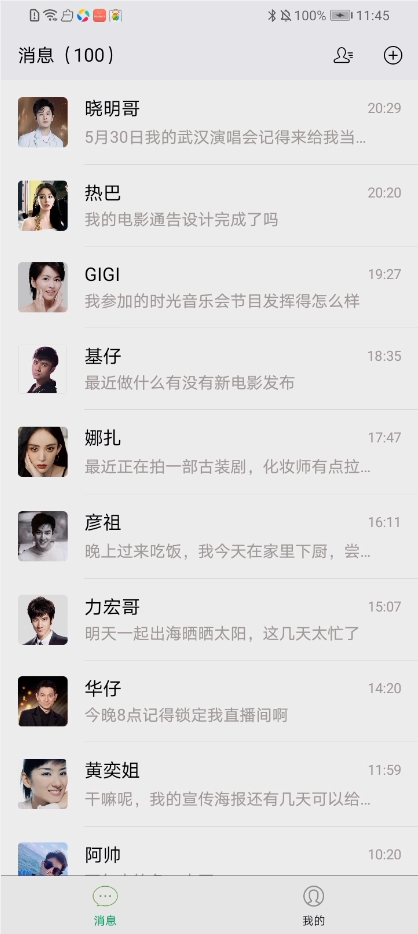
# 2. 消息列表代码
在根目录 /pages/xiaoxi/xiaoxi.nvue
<template>
	<view >
		<!-- 导航栏 -->
		<!-- #ifdef APP || H5 -->
        <chat-navbar title="消息(100)" :fixed="true"></chat-navbar>
		<!-- #endif -->

		<!-- 消息列表 -->
		<view v-for="(item,index) in chatList" :key="index">
			<view class="flex align-center bg-white">
				<!-- 头像 -->
				<view class="flex align-center justify-center"
				style="width: 150rpx;">
					<image :src="item.avatar"
					mode="widthFix" class="rounded"
					style="width: 90rpx;height: 90rpx;"></image>
				</view>
				<!-- 右边聊天部分 -->
				<view class="flex flex-column border-bottom border-light-secondary flex-1 py-3 pr-3 ">
					<!-- 上面:昵称 时间 -->
					<view class="flex justify-between align-center mb-1">
						<text class="font-md">{{item.nickname}}</text>
						<text class="font-sm text-light-muted">{{item.chat_time}}</text>
					</view>
					<!-- 下面:内容 -->
					<view class="pr-5">
						<text class="font text-light-muted u-line-1">{{item.data}}</text>
					</view>
				</view>
			</view>
		</view>

	</view>
</template>

<script>
	export default {
		data() {
			return {
				chatList:[
					{
						avatar:'https://docs-51yrc-com.oss-cn-hangzhou.aliyuncs.com/chat/avatar-01.png',
						nickname:'晓明哥',
						chat_time:'20:29',
						data:'5月30日我的武汉演唱会记得来给我当助邀嘉宾啊',
					},
					{
						avatar:'https://docs-51yrc-com.oss-cn-hangzhou.aliyuncs.com/chat/avatar-02.png',
						nickname:'热巴',
						chat_time:'20:20',
						data:'我的电影通告设计完成了吗',
					},
					{
						avatar:'https://docs-51yrc-com.oss-cn-hangzhou.aliyuncs.com/chat/avatar-03.png',
						nickname:'GIGI',
						chat_time:'19:27',
						data:'我参加的时光音乐会节目发挥得怎么样',
					},
					{
						avatar:'https://docs-51yrc-com.oss-cn-hangzhou.aliyuncs.com/chat/avatar-04.png',
						nickname:'基仔',
						chat_time:'18:35',
						data:'最近做什么有没有新电影发布',
					},
					{
						avatar:'https://docs-51yrc-com.oss-cn-hangzhou.aliyuncs.com/chat/avatar-05.png',
						nickname:'娜扎',
						chat_time:'17:47',
						data:'最近正在拍一部古装剧,化妆师有点拉,你给我设计一下',
					},
					{
						avatar:'https://docs-51yrc-com.oss-cn-hangzhou.aliyuncs.com/chat/avatar-06.png',
						nickname:'彦祖',
						chat_time:'16:11',
						data:'晚上过来吃饭,我今天在家里下厨,尝一下我的手艺',
					},
					{
						avatar:'https://docs-51yrc-com.oss-cn-hangzhou.aliyuncs.com/chat/avatar-07.png',
						nickname:'力宏哥',
						chat_time:'15:07',
						data:'明天一起出海晒晒太阳,这几天太忙了',
					},
					{
						avatar:'https://docs-51yrc-com.oss-cn-hangzhou.aliyuncs.com/chat/avatar-08.png',
						nickname:'华仔',
						chat_time:'14:20',
						data:'今晚8点记得锁定我直播间啊',
					},
					{
						avatar:'https://docs-51yrc-com.oss-cn-hangzhou.aliyuncs.com/chat/avatar-09.png',
						nickname:'黄奕姐',
						chat_time:'11:59',
						data:'干嘛呢,我的宣传海报还有几天可以给我啊',
					},
					{
						avatar:'https://docs-51yrc-com.oss-cn-hangzhou.aliyuncs.com/chat/avatar-10.png',
						nickname:'阿帅',
						chat_time:'10:20',
						data:'下午去钓鱼,去不',
					},
				],
			}
		},
		onLoad() {

		},
		methods: {

		}
	}
</script>

<style>
/* #ifdef H5 */
@import '/common/css/common.nvue.vue.css';
/* #endif */
</style>
说明:
- 如果有同学对消息列表中一行文字多出用省略号表示的
.u-line-1写法感兴趣的,可以调试浏览器查看css的写法;
# 四、消息列表头像右上角消息数量提示
# 1. 效果图
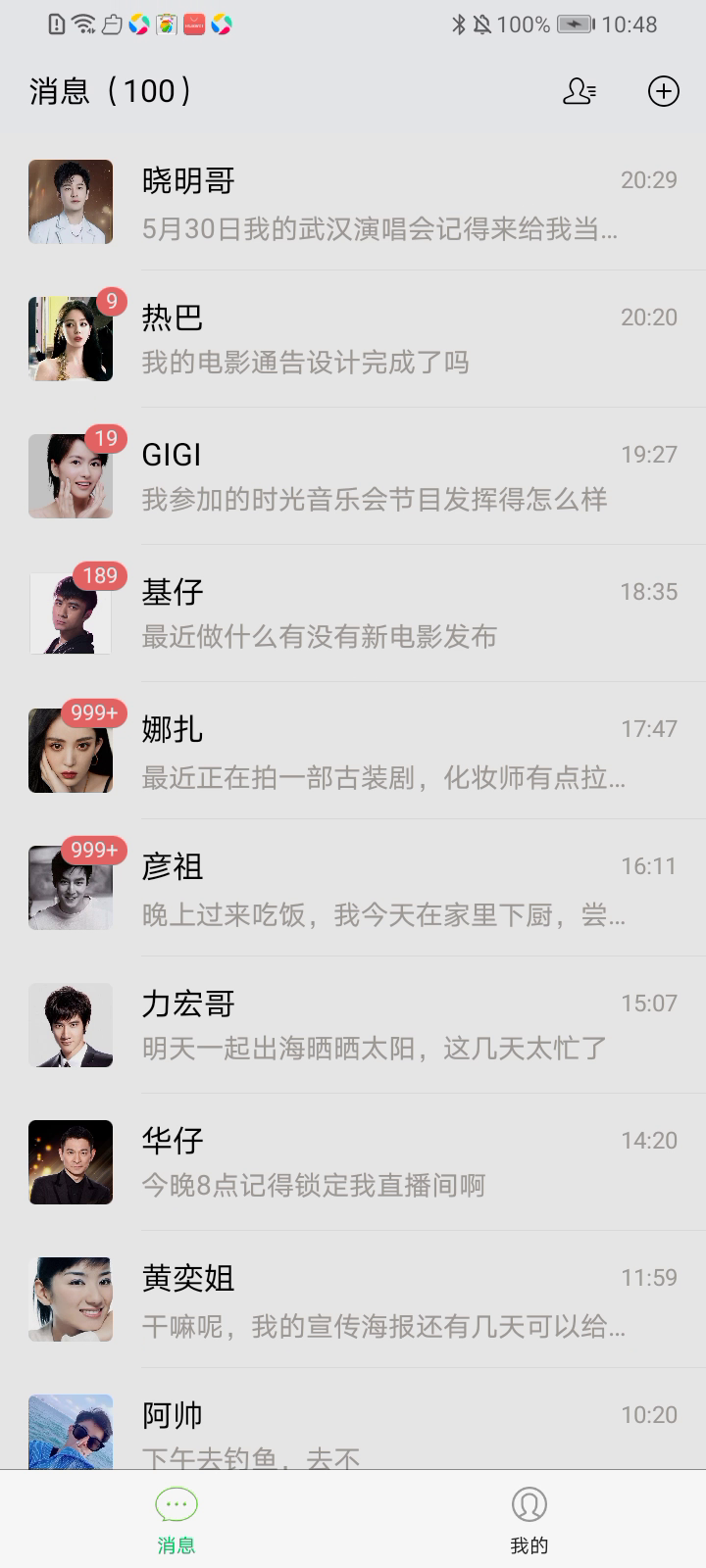
# 2. 代码
在根目录 /pages/xiaoxi/xiaoxi.nvue
<template>
	<view>
		<!-- 导航栏 -->
		<!-- #ifdef APP || H5 -->
		<chat-navbar title="消息(100)" :fixed="false"></chat-navbar>
		<!-- #endif -->

		<!-- 消息列表 -->
		<view v-for="(item,index) in chatList" :key="index">
			<view class="flex align-stretch">
				<!-- 头像 -->
				<view style="width: 150rpx;" class="flex align-center justify-center
				position-relative ">
					<!-- 头像地址 -->
					<!-- <image :src="item.avatar" mode="widthFix" style="width: 90rpx;height: 90rpx;"
					class="rounded">
					</image> -->
					<u--image :src="item.avatar" mode="widthFix"
					width="90rpx" height="90rpx" radius="8rpx"></u--image>
					<!-- 消息数量 角标-->
					<!-- <text class="bg-danger rounded-circle text-white font-sm position-absolute"
					style="padding-left: 14rpx;padding-right: 14rpx;
					padding-top: 2rpx;padding-bottom: 2rpx;
					top: 16rpx;right:10rpx;z-index: 100;">9</text> -->
					<u-badge :isDot="false" :value="item.datacount"
					absolute :offset="['16rpx','10rpx']"
					max="999" shape="circle" numberType="limit"></u-badge>
				</view>
				<!-- 右边 -->
				<view class="flex flex-column border-bottom border-light-secondary flex-1 py-3 pr-3">
					<!-- 上面:昵称 + 时间 -->
					<view class="flex justify-between align-center mb-1">
						<text class="font-md">{{item.nickname}}</text>
						<text class="font-sm text-light-muted">{{item.chat_time}}</text>
					</view>
					<!-- 下面:聊天内容 -->
					<view class="pr-5">
						<text class="font text-light-muted u-line-1">{{item.data}}</text>
					</view>
				</view>
			</view>
		</view>

	</view>
</template>

<script>
	export default {
		data() {
			return {
				chatList: [{
						avatar: 'https://docs-51yrc-com.oss-cn-hangzhou.aliyuncs.com/chat/avatar-01.png',
						nickname: '晓明哥',
						chat_time: '20:29',
						data: '5月30日我的武汉演唱会记得来给我当助邀嘉宾啊',
						datacount:0,
					},
					{
						avatar: 'https://docs-51yrc-com.oss-cn-hangzhou.aliyuncs.com/chat/avatar-02.png',
						nickname: '热巴',
						chat_time: '20:20',
						data: '我的电影通告设计完成了吗',
						datacount:9,
					},
					{
						avatar: 'https://docs-51yrc-com.oss-cn-hangzhou.aliyuncs.com/chat/avatar-03.png',
						nickname: 'GIGI',
						chat_time: '19:27',
						data: '我参加的时光音乐会节目发挥得怎么样',
						datacount:19,
					},
					{
						avatar: 'https://docs-51yrc-com.oss-cn-hangzhou.aliyuncs.com/chat/avatar-04.png',
						nickname: '基仔',
						chat_time: '18:35',
						data: '最近做什么有没有新电影发布',
						datacount:599,
					},
					{
						avatar: 'https://docs-51yrc-com.oss-cn-hangzhou.aliyuncs.com/chat/avatar-05.png',
						nickname: '娜扎',
						chat_time: '17:47',
						data: '最近正在拍一部古装剧,化妆师有点拉,你给我设计一下',
						datacount:7991,
					},
					{
						avatar: 'https://docs-51yrc-com.oss-cn-hangzhou.aliyuncs.com/chat/avatar-06.png',
						nickname: '彦祖',
						chat_time: '16:11',
						data: '晚上过来吃饭,我今天在家里下厨,尝一下我的手艺',
						datacount:79914,
					},
					{
						avatar: 'https://docs-51yrc-com.oss-cn-hangzhou.aliyuncs.com/chat/avatar-07.png',
						nickname: '力宏哥',
						chat_time: '15:07',
						data: '明天一起出海晒晒太阳,这几天太忙了',
					},
					{
						avatar: 'https://docs-51yrc-com.oss-cn-hangzhou.aliyuncs.com/chat/avatar-08.png',
						nickname: '华仔',
						chat_time: '14:20',
						data: '今晚8点记得锁定我直播间啊',
					},
					{
						avatar: 'https://docs-51yrc-com.oss-cn-hangzhou.aliyuncs.com/chat/avatar-09.png',
						nickname: '黄奕姐',
						chat_time: '11:59',
						data: '干嘛呢,我的宣传海报还有几天可以给我啊',
					},
					{
						avatar: 'https://docs-51yrc-com.oss-cn-hangzhou.aliyuncs.com/chat/avatar-10.png',
						nickname: '阿帅',
						chat_time: '10:20',
						data: '下午去钓鱼,去不',
					},
				],
			}
		},
		onLoad() {

		},
		methods: {

		}
	}
</script>

<style>
	/* #ifdef H5 */
	@import '/common/css/common.nvue.vue.css';
	/* #endif */
</style>
说明:
- app端发现当角标写在头像前面时候,就算设置了
z-index属性,依然头像会盖住角标,说明了:nvue页面的渲染是从上而下进行渲染的,这是和vue页面比较大的区别,因此在开发nvue页面的时候注意顺序,如果希望某个组件在某个组件之上,你就要写在这个组件之后,也就是越后面层级越高。;
# 五、对消息列表做一个组件封装并理解父子组件事件传递
# 1. 创建消息列表组件
/components/chat-chatlist/chat-chatlist.vue
<template>
	<view class="flex align-stretch" hover-class="bg-hover-light"
	@click="onClick(item,index)" @longpress="onLongpress">
		<!-- 头像 -->
		<view style="width: 150rpx;" class="flex align-center justify-center
		position-relative ">
			<!-- 头像地址 -->
			<!-- <image :src="item.avatar" mode="widthFix" style="width: 90rpx;height: 90rpx;"
			class="rounded">
			</image> -->
			<u--image :src="item.avatar" mode="widthFix"
			width="90rpx" height="90rpx" radius="8rpx"></u--image>
			<!-- 消息数量 角标-->
			<!-- <text class="bg-danger rounded-circle text-white font-sm position-absolute"
			style="padding-left: 14rpx;padding-right: 14rpx;
			padding-top: 2rpx;padding-bottom: 2rpx;
			top: 16rpx;right:10rpx;z-index: 100;">9</text> -->
			<u-badge :isDot="false" :value="item.datacount"
			absolute :offset="['16rpx','10rpx']"
			max="999" shape="circle" numberType="limit"></u-badge>
		</view>
		<!-- 右边 -->
		<view class="flex flex-column border-bottom border-light-secondary flex-1 py-3 pr-3">
			<!-- 上面:昵称 + 时间 -->
			<view class="flex justify-between align-center mb-1">
				<text class="font-md">{{item.nickname}}</text>
				<text class="font-sm text-light-muted">{{item.chat_time}}</text>
			</view>
			<!-- 下面:聊天内容 -->
			<view class="pr-5">
				<text class="font text-light-muted u-line-1">{{item.data}}</text>
			</view>
		</view>
	</view>
</template>

<script>
	export default{
		name:"chat-chatlist",
		props:{
			item:Object,
			index:Number
		},
		methods:{
			onClick(item,index){
				console.log('点击了列表在组件');
				this.$emit('click',{
					item,
					index
				});
			},
			onLongpress(e){
				console.log(e);
			}
		}
	}
</script>

<style>
	/* #ifdef H5 */
	@import '/common/css/common.nvue.vue.css';
	/* #endif */
</style>
# 2. 消息页使用组件,理解父子组件事件传递
在根目录 /pages/xiaoxi/xiaoxi.nvue
<template>
	<view>
		<!-- 导航栏 -->
		<!-- #ifdef APP || H5 -->
		<chat-navbar title="消息(100)" :fixed="true"></chat-navbar>
		<!-- #endif -->

		<!-- 消息列表 -->
		<view v-for="(item,index) in chatList" :key="index">
			<chat-chatlist :item="item" :index="index" @click="openChat"></chat-chatlist>
		</view>

	</view>
</template>

<script>
	export default {
		data() {
			return {
				chatList: [{
						avatar: 'https://docs-51yrc-com.oss-cn-hangzhou.aliyuncs.com/chat/avatar-01.png',
						nickname: '晓明哥',
						chat_time: '20:29',
						data: '5月30日我的武汉演唱会记得来给我当助邀嘉宾啊',
						datacount:0,
					},
					{
						avatar: 'https://docs-51yrc-com.oss-cn-hangzhou.aliyuncs.com/chat/avatar-02.png',
						nickname: '热巴',
						chat_time: '20:20',
						data: '我的电影通告设计完成了吗',
						datacount:9,
					},
					{
						avatar: 'https://docs-51yrc-com.oss-cn-hangzhou.aliyuncs.com/chat/avatar-03.png',
						nickname: 'GIGI',
						chat_time: '19:27',
						data: '我参加的时光音乐会节目发挥得怎么样',
						datacount:19,
					},
					{
						avatar: 'https://docs-51yrc-com.oss-cn-hangzhou.aliyuncs.com/chat/avatar-04.png',
						nickname: '基仔',
						chat_time: '18:35',
						data: '最近做什么有没有新电影发布',
						datacount:599,
					},
					{
						avatar: 'https://docs-51yrc-com.oss-cn-hangzhou.aliyuncs.com/chat/avatar-05.png',
						nickname: '娜扎',
						chat_time: '17:47',
						data: '最近正在拍一部古装剧,化妆师有点拉,你给我设计一下',
						datacount:7991,
					},
					{
						avatar: 'https://docs-51yrc-com.oss-cn-hangzhou.aliyuncs.com/chat/avatar-06.png',
						nickname: '彦祖',
						chat_time: '16:11',
						data: '晚上过来吃饭,我今天在家里下厨,尝一下我的手艺',
						datacount:79914,
					},
					{
						avatar: 'https://docs-51yrc-com.oss-cn-hangzhou.aliyuncs.com/chat/avatar-07.png',
						nickname: '力宏哥',
						chat_time: '15:07',
						data: '明天一起出海晒晒太阳,这几天太忙了',
					},
					{
						avatar: 'https://docs-51yrc-com.oss-cn-hangzhou.aliyuncs.com/chat/avatar-08.png',
						nickname: '华仔',
						chat_time: '14:20',
						data: '今晚8点记得锁定我直播间啊',
					},
					{
						avatar: 'https://docs-51yrc-com.oss-cn-hangzhou.aliyuncs.com/chat/avatar-09.png',
						nickname: '黄奕姐',
						chat_time: '11:59',
						data: '干嘛呢,我的宣传海报还有几天可以给我啊',
					},
					{
						avatar: 'https://docs-51yrc-com.oss-cn-hangzhou.aliyuncs.com/chat/avatar-10.png',
						nickname: '阿帅',
						chat_time: '10:20',
						data: '下午去钓鱼,去不',
					},
				],
			}
		},
		onLoad() {

		},
		methods: {
            openChat(e){
				console.log('点击了列表在页面',e);
			}
		}
	}
</script>

<style>
	/* #ifdef H5 */
	@import '/common/css/common.nvue.vue.css';
	/* #endif */
</style>
# 六、长按消息列表和加号等很多地方,弹出菜单并将其封装成组件
# 1. 基础样式
    ...
    <!-- 弹出菜单 -->
	<view style="z-index: 1000;overflow: hidden;">
		<!-- 透明蒙版,在弹出菜单之后,不能点页面其它地方 -->
		<view class="position-fixed top-0 left-0 right-0 bottom-0"
		style="background-color:rgba(0, 0, 0, 0.3);"></view>
		<!-- 菜单内容 -->
		<view class="position-fixed bg-white"
		style="left: 300rpx;top: 140rpx;">
			<view class="py-1 px-2">
				<view>撤回</view>
				<view>删除</view>
			</view>
		</view>
	</view>
	...
# 2. 写进组件 chat-tooltip
/components/chat-tooltip/chat-tooltip.vue
<template>
	<view style="z-index: 1000;overflow: hidden;" v-if="showstatus">
		<!-- 透明蒙版,在弹出菜单之后,不能点页面其它地方 -->
		<view class="position-fixed top-0 left-0 right-0 bottom-0"
		style="background-color:rgba(0, 0, 0, 0.3);" @click="hide"></view>
		<!-- 菜单内容 -->
		<view class="position-fixed bg-white"
		style="left: 300rpx;top: 140rpx;">
			<slot></slot>
		</view>
	</view>
</template>

<script>
	export default{
		name:"chat-tooltip",
		data(){
			return {
				showstatus:false,
			}
		},
		methods:{
			show(){
				this.showstatus = true
			},
			hide(){
				this.showstatus = false
			}
		}
	}
</script>

<style>
	/* #ifdef H5 */
	@import '/common/css/common.nvue.vue.css';
	/* #endif */
</style>
# 3. 长按测试组件是否执行
- 在组件
/components/chat-chatlist/chat-chatlist.vue传递长按事件到消息页
    methods:{
		...
		onLongpress(e){
			console.log('组件里面的事件对象',e);
			this.$emit('Longpress')
		}
	}
- 在根目录 消息页
/pages/xiaoxi/xiaoxi.nvue
<template>
	<view>
		<!-- 导航栏 -->
		<!-- #ifdef APP || H5 -->
		<chat-navbar title="消息(100)" :fixed="true"></chat-navbar>
		<!-- #endif -->

		<!-- 消息列表 -->
		<view v-for="(item,index) in chatList" :key="index">
			<chat-chatlist :item="item" :index="index" @click="openChat"
			@Longpress="Longpressfn"></chat-chatlist>
		</view>

		<!-- 弹出菜单 -->
		<chat-tooltip ref="chatTooltip">
			<view class="py-1 px-2">
				<view>撤回</view>
				<view>删除</view>
			</view>
		</chat-tooltip>

	</view>
</template>

<script>
	export default {
		data() {
			return {
				chatList: [{
						avatar: 'https://docs-51yrc-com.oss-cn-hangzhou.aliyuncs.com/chat/avatar-01.png',
						nickname: '晓明哥',
						chat_time: '20:29',
						data: '5月30日我的武汉演唱会记得来给我当助邀嘉宾啊',
						datacount:0,
					},
					...
				],
			}
		},
		onLoad() {

		},
		methods: {
           openChat(e){
			   console.log('点击的是消息页',e);
		   },
		   Longpressfn(){
			   console.log('页面长按');
			   this.$refs.chatTooltip.show();
		   }
		}
	}
</script>

<style>
	/* #ifdef H5 */
	@import '/common/css/common.nvue.vue.css';
	/* #endif */
</style>
# 4. 弹出菜单的蒙版强化和设置弹出菜单位置
对于弹出菜单,它的蒙版和位置有以下场景:
- 需要蒙版;
- 不需要蒙版;
- 蒙版为透明(
点击加号)或者不透明(点击设置);- 菜单位置:底部或者根据点击坐标定;
# 1. 组件:/components/chat-tooltip/chat-tooltip.vue
<template>
	<view style="z-index: 1000;overflow: hidden;" v-if="showstatus">
		<!-- 透明蒙版 , 在弹出菜单之后,不能点击其它地方-->
		<view v-if="mask"
		class="position-fixed top-0 left-0 right-0 bottom-0"
		:style="maskTransparentStyle"
		@click="hide"></view>
		<!-- 菜单内容 -->
		<view class="position-fixed bg-white"
		:style="tooltipStyle"
		:class="isBottomClass">
			<view class="py-1 px-2">
				<view><text>撤回</text></view>
				<view><text>删除</text></view>
			</view>
		</view>
	</view>
</template>

<script>
	export default {
		name:"chat-tooltip",
		props:{
			// 是否有蒙版,默认有
			mask:{
				type:Boolean,
				default:true,
			},
			// 蒙版是否透明,默认透明
			maskTransparent:{
				type:Boolean,
				default:true,
			},
			// 弹出菜单位置:底部或者根据点击坐标定
			// 是否在底部
			isBottom:{
				type:Boolean,
				default:false,
			}
		},
		data(){
			return {
				showstatus:false,
				pageX:-1,
				pageY:-1,
			}
		},
		computed:{
			// 蒙版是否透明
			maskTransparentStyle(){
				const opacity = this.maskTransparent ? 0.0 : 0.3;
				return `background-color: rgba(0, 0, 0, ${opacity});`;
			},
			// 弹出菜单是否在底部
			isBottomClass(){
				return this.isBottom ? `left-0 right-0 bottom-0` : `rounded border`;
			},
			// 弹出菜单根据点击位置弹出
			tooltipStyle(){
				let left = this.pageX >=0 ? `left:${this.pageX}px;` : ``;
				let top = this.pageY >=0 ? `top:${this.pageY}px;` : ``;
				return `${left}${top}`;
			}
		},
		methods:{
			show(left,top){
				this.pageX = left;
				this.pageY = top;
				this.showstatus = true
			},
			hide(){
				this.showstatus = false
			}
		}
	}
</script>

<style>
	/* #ifdef H5 */
	@import '/common/css/common.nvue.vue.css';
	/* #endif */
</style>
# 2. 调试
在根目录 消息页 /pages/xiaoxi/xiaoxi.nvue
<template>
	<view>
		...

		<!-- 弹出菜单 -->
		<chat-tooltip ref="chatTooltip"
		:mask="true" :maskTransparent="false"
		:isBottom="false"></chat-tooltip>

	</view>
</template>

<script>
	export default {
		...
		methods: {
            ...
		    Longpressfn(e){
			   console.log('长按的是消息页',e);
			   let x = 0,y =0;
			   // #ifdef H5 || MP
			   x = e.changedTouches[0].clientX;
			   y = e.changedTouches[0].clientY;
			   // #endif
			   // #ifdef APP
			   x = e.changedTouches[0].screenX;
			   y = e.changedTouches[0].screenY;
			   // #endif
			   this.$refs.chatTooltip.show(x,y);
		    }
		}
	}
</script>

<style>
	/* #ifdef H5 */
	@import '/common/css/common.nvue.vue.css';
	/* #endif */
</style>
# 5. 处理弹出菜单超出屏幕的问题
# 1. 组件:/components/chat-tooltip/chat-tooltip.vue
<template>
	<view style="z-index: 1000;overflow: hidden;" v-if="showstatus">
		<!-- 透明蒙版 , 在弹出菜单之后,不能点击其它地方-->
		<view v-if="mask"
		class="position-fixed top-0 left-0 right-0 bottom-0"
		:style="maskTransparentStyle"
		@click="hide"></view>
		<!-- 菜单内容 -->
		<view class="position-fixed bg-white"
		:style="tooltipStyle"
		:class="isBottomClass">
			<slot></slot>
		</view>
	</view>
</template>

<script>
	export default {
		name:"chat-tooltip",
		props:{
			...
			//弹出菜单宽度rpx
			tooltipWidth:{
				type:Number,
				default:0
			},
			//弹出菜单高度rpx
			tooltipHeight:{
				type:Number,
				default:0
			},
		},
		data(){
			return {
				...
				maxLeft:0,
				maxTop:0,
			}
		},
		mounted() {
			const info = uni.getSystemInfoSync();
			console.log('设备信息',info);
			this.maxLeft = info.windowWidth - uni.upx2px(this.tooltipWidth);
			this.maxTop = info.windowHeight - uni.upx2px(this.tooltipHeight);
			// console.log(this.maxLeft,this.maxTop);
		},
		computed:{
			...
			// 弹出菜单的位置根据坐标定
			tooltipStyle(){
				let left = this.pageX >=0 ? `left: ${this.pageX}px;`: ``;
				let top = this.pageY >=0 ? `top: ${this.pageY}px;`: ``;
				return `${left}${top}
				width:${uni.upx2px(this.tooltipWidth)}px;
				height:${uni.upx2px(this.tooltipHeight)}px;`
			}
		},
		methods:{
			show(left,top){
				// console.log(this.maxLeft,this.maxTop);
				this.pageX = left > this.maxLeft ? this.maxLeft : left;
				this.pageY = top > this.maxTop ? this.maxTop : top;
				this.showstatus = true
			},
			...
		}
	}
</script>

...
# 2. 调试
在根目录 消息页 /pages/xiaoxi/xiaoxi.nvue
...
    <!-- 弹出菜单 -->
	<chat-tooltip ref="chatTooltip"
	:mask="true" :maskTransparent="false"
	:isBottom="false"
	:tooltipWidth="280" :tooltipHeight="400">
		<view>
			<view><text>撤回</text></view>
			<view><text>删除</text></view>
		</view>
	</chat-tooltip>
...
# 6. 菜单内容设置
在根目录 消息页 /pages/xiaoxi/xiaoxi.nvue
<template>
	<view>
		...

		<!-- 弹出菜单 -->
		<chat-tooltip ref="chatTooltip" :mask="true" :maskTransparent="false" :isBottom="false" :tooltipWidth="180"
			:tooltipHeight="tooltipHeight">
			<view class="flex flex-1 flex-column">
				<view class="flex-1 align-start justify-center pl-2" hover-class="bg-hover-light"
					v-for="(item,index) in menuList" :key="index" @click="clickType(item.type)">
					<text>{{item.name}}</text>
				</view>
			</view>
		</chat-tooltip>

	</view>
</template>

<script>
	export default {
		data() {
			return {
				menuEveHeight: 60, //每个菜单高度设定rpx
				menuList: [{
						name: '置顶',
						type: 'zhiding'
					},
					{
						name: '删除',
						type: 'deleteChat'
					},
				],
				...
			}
		},
		onLoad() {

		},
		computed: {
			//菜单高度
			tooltipHeight() {
				return this.menuList.length * this.menuEveHeight;
			}
		},
		methods: {
			clickType(e) {
               console.log('点击菜单',e);
			},
			...
		}
	}
</script>

<style>
	...
</style>
# 7. 菜单动画
# 1. app端nvue页面的动画
参考weex官方文档: https://weexapp.com/zh/docs/modules/animation.html (opens new window)
/components/chat-tooltip/chat-tooltip.vue
<template>
	<view style="z-index: 1000;overflow: hidden;" v-if="showstatus">
		<!-- 透明蒙版 , 在弹出菜单之后,不能点击其它地方-->
		<view v-if="mask"
		class="position-fixed top-0 left-0 right-0 bottom-0"
		:style="maskTransparentStyle"
		@click="hide"></view>
		<!-- 菜单内容 -->
		<view class="position-fixed bg-white chat-tooltip-animate"
		:style="tooltipStyle"
		:class="isBottomClass"
		ref="tooltipContent">
			<slot></slot>
		</view>
	</view>
</template>

<script>
	export default {
		name:"chat-tooltip",
		...
		methods:{
			show(left,top){
				console.log(this.maxLeft,this.maxTop);
				this.pageX = left > this.maxLeft ? this.maxLeft : left;
				this.pageY = top > this.maxTop ? this.maxTop : top;
				this.showstatus = true

				// #ifdef APP-PLUS-NVUE
				this.$nextTick(()=>{
					//app端nvue页面动画实现
					const animation = weex.requireModule('animation');
					animation.transition(this.$refs.tooltipContent, {
							styles: {
								opacity: 1,
								transform: 'scale(1, 1)',
								transformOrigin:'left top',
							},
							duration: 100, //ms
							timingFunction: 'ease',
							needLayout:false, //是否影响布局
							delay: 0 //ms
					    }, function () {
					        console.log('动画完成');
					    }
					);
				});
				// #endif

			},
			hide(){
				// #ifdef APP-PLUS-NVUE
				this.$nextTick(()=>{
					//app端nvue页面动画实现
					const animation = weex.requireModule('animation');
					animation.transition(this.$refs.tooltipContent, {
							styles: {
								opacity: 0,
								transform: 'scale(0, 0)',
								transformOrigin:'left top',
							},
							duration: 100, //ms
							timingFunction: 'ease',
							needLayout:false, //是否影响布局
							delay: 0 //ms
					    }, ()=> {
					        this.showstatus = false
							console.log('关闭菜单动画完成');
					    }
					);
				});
				// #endif
				// #ifndef APP-PLUS-NVUE
				this.showstatus = false
				// #endif
			}
		}
	}
</script>

<style scoped>
	/* #ifdef H5 */
	@import '/common/css/common.nvue.vue.css';
	/* #endif */
	.chat-tooltip-animate{
		/* #ifdef APP-PLUS-NVUE */
		transform: scale(0,0);
		opacity: 0;
		/* #endif */
	}
</style>
# 七、点击加号弹出菜单
# ① 组件 /components/chat-navbar-icon-button/chat-navbar-icon-button.vue
<template>
	<view style="width: 90rpx;height: 90rpx;"
	class="flex align-center justify-center"
	hover-class="bg-hover-light" @click="$emit('click')">
		<slot></slot>
	</view>
</template>

<script>
	export default {
		name:"chat-navbar-icon-button",
	}
</script>

<style>
</style>
# ② 组件 /components/chat-navbar/chat-navbar.vue
<!-- 右边 -->
<view class="flex align-center">
<chat-navbar-icon-button @click="openUser">
<text class="iconfont font-lg"></text>
</chat-navbar-icon-button>
<chat-navbar-icon-button @click="openPlus">
<text class="iconfont font-md"></text>
</chat-navbar-icon-button>
</view>
...
<!-- 占位符:占用 状态栏 + 导航栏的高度 -->
<view :style="fixedHeightStyle" v-if="fixed"></view>
<!-- 导航栏点击加号的菜单 -->
<chat-tooltip ref="chatTooltip" :mask="true"
:maskTransparent="true" :isBottom="false"
:tooltipWidth="260" :tooltipHeight="tooltipHeight"
tooltipClass="bg-dark text-white"
transformOrigin="right top">
<view class="flex flex-column flex-1">
<view class="flex-1 align-center justify-start pl-2 flex"
hover-class="bg-hover-dark"
v-for="(item,index) in menuList" :key="index" @click="clickType(item.type)">
<text class="iconfont font-md mr-3 text-white">{{item.icon}}</text>
<text class="text-white">{{item.name}}</text>
</view>
</view>
<!-- 一个小箭头 -->
<view class="position-fixed right-0"
style="right: 26rpx;" :style="'top:'+ (fixedHeight - 6) + 'px;'">
<text class="iconfont font-lg text-dark"></text>
</view>
</chat-tooltip>
<script>
export default {
...
data() {
return {
...
menuEveHeight: 100, //每个菜单默认高度是rpx
menuList: [{
name: "发起群聊",
type: 'qunliao',
icon:'\ue60a',
},
{
name: "添加朋友",
type: 'addfriend',
icon:'\ue65d',
},
{
name: "扫一扫",
type: 'saoyisao',
icon:'\ue661',
},
],
}
},
methods: {
openUser(){
console.log('点击联系人图标');
},
openPlus(){
console.log('点击加号图标');
const info = uni.getSystemInfoSync();
let left = uni.upx2px(750 - 260) - 5;
let top = this.fixedHeight;
this.$refs.chatTooltip.show(left,top);
},
clickType(e){
console.log('点击菜单项目',e);
}
},
computed:{
...
tooltipHeight() {
return this.menuList.length * this.menuEveHeight;
}
}
}
</script>
# ③ 组件 /components/chat-tooltip/chat-tooltip.vue
<template>
	<view style="z-index: 1000;overflow: hidden;" v-if="showstatus">
		<!-- 透明蒙版 , 在弹出菜单之后,不能点击其它地方-->
		...
		<!-- 菜单内容 -->
		<view class="position-fixed chat-tooltip-animate"
		:style="tooltipStyle" :class="[isBottomClass,tooltipClass]"
		ref="tooltipContent">
			<slot></slot>
		</view>
	</view>
</template>

<script>
	export default {
		name: "chat-tooltip",
		props: {
			...
			// 弹出菜单Class样式自定义
			tooltipClass:{
				type: String,
				default: 'bg-white'
			},
			// 菜单弹出方向
			transformOrigin:{
				type: String,
				default: 'left top'
			}
		},
		...
		methods: {
			show(left, top) {
				...

				// #ifdef APP-PLUS-NVUE
				// 针对app端的nvue页面的动画
				this.$nextTick(() => {
					...
					animation.transition(this.$refs.tooltipContent, {
						styles: {
							...
							transformOrigin:this.transformOrigin,
						},
						...
					}, ()=> {
						...
					});
				});
				// #endif
			},
			hide() {
				// #ifdef APP-PLUS-NVUE
				...
				animation.transition(this.$refs.tooltipContent, {
					styles: {
						...
						transformOrigin:this.transformOrigin,
					},
					...
				}, ()=> {
					...
				});
				// #endif
				...
			}
		}
	}
</script>

<style>
	...
</style>
# 八、完成置顶和删除聊天的静态页面效果
主要突破点就是长按的时候找到是哪一条聊天记录
# 1. 删除聊天
- 在组件
/components/chat-chatlist/chat-chatlist.vue
<template>
	<view class="flex align-stretch" hover-class="bg-hover-light"
	@click="onClick(item,index)" @longpress="onLongpress($event,index,item)">
		...
	</view>
</template>

<script>
	export default{
		...
		methods:{
			...
			onLongpress(e,index,item){
				console.log('组件里面的事件对象',e);
				let x = 0,
					y = 0;
				// #ifdef H5 || MP
				x = e.changedTouches[0].clientX;
				y = e.changedTouches[0].clientY;
				// #endif
				// #ifdef APP
				x = e.changedTouches[0].screenX;
				y = e.changedTouches[0].screenY;
				// #endif
				this.$emit('Longpress',{
					x,
					y,
					index,
					item
				});
			}
		}
	}
</script>

<style>
	...
</style>
- 在根目录 消息页
/pages/xiaoxi/xiaoxi.nvue
<template>
	<view>
		...
	</view>
</template>

<script>
	export default {
		data() {
			return {
				chatListIndex:-1, // 哪一条聊天记录
				menuEveHeight: 80, //每个菜单默认高度是60rpx
				...
			}
		},
		...
		methods: {
			clickType(e) {
				console.log('点击菜单',e);
				switch(e){
					case 'deleteChat':
					   this.deleteChat();
					   break;
					case 'zhiding':
					   break;
				}
				this.$refs.chatTooltip.hide();
			},
			//删除当前聊天
			deleteChat(){
				this.chatList.splice(this.chatListIndex,1);
			},
			...,
			Longpressfn(e) {
				console.log('长按的是消息页', e);
				this.$refs.chatTooltip.show(e.x, e.y);
				this.chatListIndex = e.index;
			},
		}
	}
</script>

<style>
	...
</style>
# 2. 置顶聊天
可以把置顶聊天和正常消息分为两组处理,置顶消息放在最前面,正常消息放在后面,可以给每条信息加一个是否置顶的标识符:
isZhiding:true/false
    <!-- 消息列表 -->
	<!-- 置顶消息列表 -->
	<view v-for="(item,index) in chatList" :key="'zhiding_' + index">
		<chat-chatlist v-if="item.isZhiding"
		:item="item" :index="index" @click="openChat"
		@Longpress="Longpressfn"></chat-chatlist>
	</view>
	<!-- 正常消息列表 -->
	<view v-for="(item,index) in chatList" :key="'normal_' + index">
		<chat-chatlist v-if="!item.isZhiding"
		:item="item" :index="index" @click="openChat"
		@Longpress="Longpressfn"></chat-chatlist>
	</view>
	...
	<script>
	    export default {
			methods: {
				clickType(e) {
					console.log('点击菜单',e);
					switch(e){
						case 'deleteChat':
						this.deleteChat();
						break;
						case 'zhiding':
						this.zhiding();
						break;
					}
					this.$refs.chatTooltip.hide();
				},
				...
				// 置顶或取消置顶
				zhiding(){
					let item = this.chatList[this.chatListIndex];
					let isZhiding = item.isZhiding;
					// item.isZhiding = isZhiding ? false : true;
					item.isZhiding = !item.isZhiding;
				},
				...
				Longpressfn(e) {
					console.log('长按的是消息页', e);
					this.chatListIndex = e.index;
					this.menuList[0].name = e.item.isZhiding ? '取消置顶' :'置顶';
					this.$refs.chatTooltip.show(e.x, e.y);
				},
			}
		}
	</script>
# 九、兼容微信小程序
# 1. 微信小程序去掉原生导航栏
在根目录找到 pages.json配置文件:
    ...
    {
		"path" : "pages/xiaoxi/xiaoxi",
		"style" :
		{
			"navigationBarTitleText" : "消息",
			"navigationStyle": "custom"
		}
	},
    ...
# 2. 组件 /components/chat-navbar/chat-navbar.vue 导航栏
<template>
<view>
<!-- 导航栏 -->
<view class="bg-light" :class="[fixed ? 'fixed-top' : '']">
<!-- 状态栏 -->
<view :style="'height:' + statusBarHeight + 'px;'"></view>
<!-- 导航 -->
<!-- #ifdef APP || H5 -->
<view class="flex justify-between align-center"
style="height: 90rpx;">
<!-- 左边 -->
<view>
<!-- 标题 -->
<text class="ml-3" v-if="title">{{title}}</text>
</view>
<!-- 右边 -->
<view class="flex align-center">
<chat-navbar-icon-button @click="openUser">
<text class="iconfont font-lg"></text>
</chat-navbar-icon-button>
<chat-navbar-icon-button @click="openPlus">
<text class="iconfont font-md"></text>
</chat-navbar-icon-button>
</view>
</view>
<!-- #endif -->
<!-- #ifdef MP -->
<view class="flex align-center"
style="height: 90rpx;justify-content:space-between;">
<!-- 左边 -->
<view class="flex align-center flex-1">
<chat-navbar-icon-button @click="openPlus">
<text class="iconfont font-md"></text>
</chat-navbar-icon-button>
<chat-navbar-icon-button @click="openUser">
<text class="iconfont font-lg"></text>
</chat-navbar-icon-button>
</view>
<!-- 中间 -->
<view class="flex align-center justify-center flex-1">
<text class="ml-3" v-if="title">{{title}}</text>
</view>
<!-- 右边 -->
<view class="flex-1 bg-success"></view>
</view>
<!-- #endif -->
</view>
<!-- 占位符:占用 状态栏 + 导航栏的高度 -->
<view :style="fixedHeightStyle" v-if="fixed"></view>
<!-- 导航栏点击加号的弹出菜单 -->
<chat-tooltip ref="chatTooltip" :mask="true"
:maskTransparent="true"
:isBottom="false" :tooltipWidth="260"
:tooltipHeight="tooltipHeight"
tooltipClass="bg-dark"
transformOrigin="right top">
<view class="flex flex-column flex-1">
<!-- 菜单内容 -->
<view class="flex-1 align-center justify-start pl-2 flex"
hover-class="bg-hover-dark"
v-for="(item,index) in menuList" :key="index" @click="clickType(item.type)">
<text class="iconfont font-md mr-3 text-white">{{item.icon}}</text>
<text class="text-white">{{item.name}}</text>
</view>
<!-- 菜单箭头 -->
<view class="position-fixed right-0"
:style="jiantouStyle">
<text class="iconfont font-lg text-dark"></text>
</view>
</view>
</chat-tooltip>
</view>
</template>
<script>
export default {
...,
methods: {
...,
openPlus(){
console.log('点击了加号图标在组件');
const info = uni.getSystemInfoSync();
let left = 5;
// #ifdef APP || H5
left = info.windowWidth - uni.upx2px(260) - 5;
// #endif
let top = this.fixedHeight;
this.$refs.chatTooltip.show(left, top);
},
...
},
computed:{
...,
jiantouStyle(){
let x = `right: 26rpx;`;
// #ifdef MP
x = `left: 26rpx;`;
// #endif
return `top:${this.fixedHeight - 6}px;${x}`;
}
}
}
</script>
<style>
...
</style>
# 十、消息页静态功能完整代码
# 1. 组件 /components/chat-navbar-icon-button/chat-navbar-icon-button.vue 导航栏图标按钮
<template>
	<view style="width: 90rpx;height: 90rpx;"
	class="flex align-center justify-center"
	hover-class="bg-hover-light"
	@click="$emit('click')">
		<slot></slot>
	</view>
</template>

<script>
	export default {
		name:"chat-navbar-icon-button",
	}
</script>

<style>
</style>
# 2. 组件 /components/chat-navbar/chat-navbar.vue 导航栏
<template>
<view>
<!-- 导航栏 -->
<view class="bg-light" :class="[fixed ? 'fixed-top' : '']">
<!-- 状态栏 -->
<view :style="'height:' + statusBarHeight + 'px;'"></view>
<!-- 导航 -->
<!-- #ifdef APP || H5 -->
<view class="flex justify-between align-center"
style="height: 90rpx;">
<!-- 左边 -->
<view>
<!-- 标题 -->
<text class="ml-3" v-if="title">{{title}}</text>
</view>
<!-- 右边 -->
<view class="flex align-center">
<chat-navbar-icon-button @click="openUser">
<text class="iconfont font-lg"></text>
</chat-navbar-icon-button>
<chat-navbar-icon-button @click="openPlus">
<text class="iconfont font-md"></text>
</chat-navbar-icon-button>
</view>
</view>
<!-- #endif -->
<!-- #ifdef MP -->
<view class="flex align-center"
style="height: 90rpx;justify-content:space-between;">
<!-- 左边 -->
<view class="flex align-center flex-1">
<chat-navbar-icon-button @click="openPlus">
<text class="iconfont font-md"></text>
</chat-navbar-icon-button>
<chat-navbar-icon-button @click="openUser">
<text class="iconfont font-lg"></text>
</chat-navbar-icon-button>
</view>
<!-- 中间 -->
<view class="flex align-center justify-center flex-1">
<text class="ml-3" v-if="title">{{title}}</text>
</view>
<!-- 右边 -->
<view class="flex-1 bg-success"></view>
</view>
<!-- #endif -->
</view>
<!-- 占位符:占用 状态栏 + 导航栏的高度 -->
<view :style="fixedHeightStyle" v-if="fixed"></view>
<!-- 导航栏点击加号的弹出菜单 -->
<chat-tooltip ref="chatTooltip" :mask="true"
:maskTransparent="true"
:isBottom="false" :tooltipWidth="260"
:tooltipHeight="tooltipHeight"
tooltipClass="bg-dark"
transformOrigin="right top">
<view class="flex flex-column flex-1">
<!-- 菜单内容 -->
<view class="flex-1 align-center justify-start pl-2 flex"
hover-class="bg-hover-dark"
v-for="(item,index) in menuList" :key="index" @click="clickType(item.type)">
<text class="iconfont font-md mr-3 text-white">{{item.icon}}</text>
<text class="text-white">{{item.name}}</text>
</view>
<!-- 菜单箭头 -->
<view class="position-fixed right-0"
:style="jiantouStyle">
<text class="iconfont font-lg text-dark"></text>
</view>
</view>
</chat-tooltip>
</view>
</template>
<script>
export default {
name:"chat-navbar",
props:{
// 导航栏标题
title:{
type:String,
default:''
},
// 是否固定到顶部
fixed:{
type:Boolean,
default:true
}
},
data() {
return {
statusBarHeight:0,//状态栏高度动态计算
fixedHeight:0, //占位:状态栏+导航栏
menuEveHeight: 100, //每个菜单默认高度是rpx
menuList: [
{
name: "发起群聊",
type: 'qunliao',
icon:'\ue60a',
},
{
name: "添加朋友",
type: 'addfriend',
icon:'\ue65d',
},
{
name: "扫一扫",
type: 'saoyisao',
icon:'\ue661',
},
],
}
},
mounted() {
this.statusBarHeight = uni.getSystemInfoSync().statusBarHeight;
// console.log('系统信息',uni.getSystemInfoSync());
this.fixedHeight = this.statusBarHeight + uni.upx2px(90);
// console.log('占位高度',this.fixedHeight);
},
methods: {
openUser(){
console.log('点击了通讯录图标');
},
openPlus(){
console.log('点击了加号图标在组件');
const info = uni.getSystemInfoSync();
let left = 5;
// #ifdef APP || H5
left = info.windowWidth - uni.upx2px(260) - 5;
// #endif
let top = this.fixedHeight;
this.$refs.chatTooltip.show(left, top);
},
clickType(e) {
console.log('点击菜单',e);
},
},
computed:{
fixedHeightStyle(){
return `height:${this.fixedHeight}px;`;
},
tooltipHeight() {
return this.menuList.length * this.menuEveHeight;
},
jiantouStyle(){
let x = `right: 26rpx;`;
// #ifdef MP
x = `left: 26rpx;`;
// #endif
return `top:${this.fixedHeight - 6}px;${x}`;
}
}
}
</script>
<style>
/* #ifdef H5 */
@import '/common/css/common.nvue.vue.css';
/* #endif */
</style>
# 3. 组件 /components/chat-tooltip/chat-tooltip.vue 弹出菜单
<template>
	<view style="z-index: 1000;overflow: hidden;" v-if="showstatus">
		<!-- 透明蒙版 , 在弹出菜单之后,不能点击其它地方-->
		<view v-if="mask" class="position-fixed top-0 left-0 right-0 bottom-0" :style="maskTransparentStyle"
			@click="hide"></view>
		<!-- 菜单内容 -->
		<view class="position-fixed chat-tooltip-animate"
		:style="tooltipStyle" :class="[isBottomClass,tooltipClass]"
		ref="tooltipContent">
			<slot></slot>
		</view>
	</view>
</template>

<script>
	export default {
		name: "chat-tooltip",
		props: {
			//是否有蒙版,默认是有
			mask: {
				type: Boolean,
				default: true
			},
			//蒙版是否透明,默认是透明的
			maskTransparent: {
				type: Boolean,
				default: true
			},
			//弹出菜单位置,是否在底部,默认不在底部
			isBottom: {
				type: Boolean,
				default: false
			},
			// 弹出菜单宽度
			tooltipWidth: {
				type: Number,
				default: 0
			},
			// 弹出菜单高度
			tooltipHeight: {
				type: Number,
				default: 0
			},
			// 弹出菜单的class样式
			tooltipClass:{
				type: String,
				default: 'bg-white'
			},
			// 弹出菜单的动画方向
			transformOrigin:{
				type: String,
				default: 'left top'
			}
		},
		data() {
			return {
				showstatus: false,
				pageX: -1,
				pageY: -1,
				maxLeft: 0,
				maxTop: 0
			}
		},
		mounted() {
			const info = uni.getSystemInfoSync();
			console.log('设备信息', info);
			this.maxLeft = info.windowWidth - uni.upx2px(this.tooltipWidth);
			this.maxTop = info.windowHeight - uni.upx2px(this.tooltipHeight);
			// console.log(this.maxLeft,this.maxTop);
		},
		computed: {
			//蒙版是否透明
			maskTransparentStyle() {
				const opacity = this.maskTransparent ? 0.0 : 0.3;
				return `background-color: rgba(0, 0, 0, ${opacity});`;
			},
			//弹出菜单位置是否在底部
			isBottomClass() {
				return this.isBottom ? `left-0 right-0 bottom-0` : `border rounded`;
			},
			// 弹出菜单的位置根据坐标定
			tooltipStyle() {
				let left = this.pageX >= 0 ? `left: ${this.pageX}px;` : ``;
				let top = this.pageY >= 0 ? `top: ${this.pageY}px;` : ``;
				return `${left}${top}
				width:${uni.upx2px(this.tooltipWidth)}px;
				height:${this.tooltipHeight}rpx;`
			}
		},
		methods: {
			show(left, top) {
				console.log(this.maxLeft, this.maxTop);
				this.pageX = left > this.maxLeft ? this.maxLeft : left;
				this.pageY = top > this.maxTop ? this.maxTop : top;
				this.showstatus = true

				// #ifdef APP-PLUS-NVUE
				// 针对app端的nvue页面的动画
				this.$nextTick(() => {
					const animation = weex.requireModule('animation');
					animation.transition(this.$refs.tooltipContent, {
						styles: {
							opacity: 1,
							transform: 'scale(1, 1)',
							transformOrigin: this.transformOrigin,
						},
						duration: 100, //ms
						timingFunction: 'ease',
						needLayout: false,
						delay: 0 //ms
					}, ()=> {
						console.log('菜单动画完成');
					});
				});
				// #endif
			},
			hide() {
				// #ifdef APP-PLUS-NVUE
				const animation = weex.requireModule('animation');
				animation.transition(this.$refs.tooltipContent, {
					styles: {
						opacity: 0,
						transform: 'scale(0, 0)',
						transformOrigin:this.transformOrigin,
					},
					duration: 100, //ms
					timingFunction: 'ease',
					needLayout: false,
					delay: 0 //ms
				}, ()=> {
					console.log('菜单动画完成');
					this.showstatus = false
				});
				// #endif
				// #ifndef APP-PLUS-NVUE
				this.showstatus = false
				// #endif
			}
		}
	}
</script>

<style>
	/* #ifdef H5 */
	@import '/common/css/common.nvue.vue.css';

	/* #endif */
	/* #ifdef APP-PLUS-NVUE */
	.chat-tooltip-animate {
		opacity: 0;
		transform: scale(0, 0);
	}

	/* #endif */
</style>
# 4. 组件 /components/chat-chatlist/chat-chatlist.vue 聊天列表
<template>
	<view class="flex align-stretch" hover-class="bg-hover-light"
	@click="onClick(item,index)" @longpress="onLongpress($event,index,item)"
	:class="item.isZhiding ? 'bg-light': 'bg-white'">
		<!-- 头像 -->
		<view style="width: 150rpx;" class="flex align-center justify-center
		position-relative ">
			<!-- 头像地址 -->
			<!-- <image :src="item.avatar" mode="widthFix" style="width: 90rpx;height: 90rpx;"
			class="rounded">
			</image> -->
			<u--image :src="item.avatar" mode="widthFix"
			width="90rpx" height="90rpx" radius="8rpx"></u--image>
			<!-- 消息数量 角标-->
			<!-- <text class="bg-danger rounded-circle text-white font-sm position-absolute"
			style="padding-left: 14rpx;padding-right: 14rpx;
			padding-top: 2rpx;padding-bottom: 2rpx;
			top: 16rpx;right:10rpx;z-index: 100;">9</text> -->
			<u-badge :isDot="false" :value="item.datacount"
			absolute :offset="['16rpx','10rpx']"
			max="999" shape="circle" numberType="limit"></u-badge>
		</view>
		<!-- 右边 -->
		<view class="flex flex-column border-bottom border-light-secondary flex-1 py-3 pr-3">
			<!-- 上面:昵称 + 时间 -->
			<view class="flex justify-between align-center mb-1">
				<text class="font-md">{{item.nickname}}</text>
				<text class="font-sm text-light-muted">{{item.chat_time}}</text>
			</view>
			<!-- 下面:聊天内容 -->
			<view class="pr-5">
				<text class="font text-light-muted u-line-1">{{item.data}}</text>
			</view>
		</view>
	</view>
</template>

<script>
	export default{
		name:"chat-chatlist",
		props:{
			item:Object,
			index:Number,
		},
		methods:{
			onClick(item,index){
				console.log('点击的是组件',item);
				this.$emit('click',{
					item,
					index
				});
			},
			onLongpress(e,index,item){
				console.log('组件里面的事件对象',e);
				let x = 0,
					y = 0;
				// #ifdef H5 || MP
				x = e.changedTouches[0].clientX;
				y = e.changedTouches[0].clientY;
				// #endif
				// #ifdef APP
				x = e.changedTouches[0].screenX;
				y = e.changedTouches[0].screenY;
				// #endif
				this.$emit('Longpress',{
					x,
					y,
					index,
					item
				});
			}
		}
	}
</script>

<style>
	/* #ifdef H5 */
	@import '/common/css/common.nvue.vue.css';
	/* #endif */
</style>
# 5. 消息页 /pages/xiaoxi/xiaoxi.nvue
<template>
	<view>
		<!-- 导航栏 -->
		<chat-navbar title="消息(100)" :fixed="true"></chat-navbar>

		<!-- 消息列表 -->
		<!-- 置顶消息 -->
		<view v-for="(item,index) in chatList" :key="'zhiding_' + index">
			<chat-chatlist v-if="item.isZhiding"
			:item="item" :index="index"
			@click="openChat" @Longpress="Longpressfn"></chat-chatlist>
		</view>
		<!-- 普通消息 -->
		<view v-for="(item,index) in chatList" :key="'normal_' + index">
			<chat-chatlist v-if="!item.isZhiding"
			:item="item" :index="index"
			@click="openChat" @Longpress="Longpressfn"></chat-chatlist>
		</view>

		<!-- 弹出菜单 -->
		<chat-tooltip ref="chatTooltip" :mask="true"
		:maskTransparent="false" :isBottom="false"
		:tooltipWidth="180"
			:tooltipHeight="tooltipHeight">
			<view class="flex flex-column flex-1">
				<view class="flex-1 align-start justify-center pl-2" hover-class="bg-hover-light"
					v-for="(item,index) in menuList" :key="index" @click="clickType(item.type)">
					<text>{{item.name}}</text>
				</view>
			</view>
		</chat-tooltip>

	</view>
</template>

<script>
	export default {
		data() {
			return {
				chatListIndex:-1, //哪一条消息的索引
				menuEveHeight: 80, //每个菜单默认高度是60rpx
				menuList: [{
						name: "置顶",
						type: 'zhiding'
					},
					{
						name: "删除",
						type: 'deleteChat'
					},
				],
				chatList: [{
						avatar: 'https://docs-51yrc-com.oss-cn-hangzhou.aliyuncs.com/chat/avatar-01.png',
						nickname: '晓明哥',
						chat_time: '20:29',
						data: '5月30日我的武汉演唱会记得来给我当助邀嘉宾啊',
						datacount: 0,
						isZhiding:false,
					},
					{
						avatar: 'https://docs-51yrc-com.oss-cn-hangzhou.aliyuncs.com/chat/avatar-02.png',
						nickname: '热巴',
						chat_time: '20:20',
						data: '我的电影通告设计完成了吗',
						datacount: 9,
						isZhiding:true,
					},
					{
						avatar: 'https://docs-51yrc-com.oss-cn-hangzhou.aliyuncs.com/chat/avatar-03.png',
						nickname: 'GIGI',
						chat_time: '19:27',
						data: '我参加的时光音乐会节目发挥得怎么样',
						datacount: 19,
						isZhiding:false,
					},
					{
						avatar: 'https://docs-51yrc-com.oss-cn-hangzhou.aliyuncs.com/chat/avatar-04.png',
						nickname: '基仔',
						chat_time: '18:35',
						data: '最近做什么有没有新电影发布',
						datacount: 599,
						isZhiding:true,
					},
					{
						avatar: 'https://docs-51yrc-com.oss-cn-hangzhou.aliyuncs.com/chat/avatar-05.png',
						nickname: '娜扎',
						chat_time: '17:47',
						data: '最近正在拍一部古装剧,化妆师有点拉,你给我设计一下',
						datacount: 7991,
						isZhiding:false,
					},
					{
						avatar: 'https://docs-51yrc-com.oss-cn-hangzhou.aliyuncs.com/chat/avatar-06.png',
						nickname: '彦祖',
						chat_time: '16:11',
						data: '晚上过来吃饭,我今天在家里下厨,尝一下我的手艺',
						datacount: 79914,
						isZhiding:false,
					},
					{
						avatar: 'https://docs-51yrc-com.oss-cn-hangzhou.aliyuncs.com/chat/avatar-07.png',
						nickname: '力宏哥',
						chat_time: '15:07',
						data: '明天一起出海晒晒太阳,这几天太忙了',
						isZhiding:false,
					},
					{
						avatar: 'https://docs-51yrc-com.oss-cn-hangzhou.aliyuncs.com/chat/avatar-08.png',
						nickname: '华仔',
						chat_time: '14:20',
						data: '今晚8点记得锁定我直播间啊',
						isZhiding:false,
					},
					{
						avatar: 'https://docs-51yrc-com.oss-cn-hangzhou.aliyuncs.com/chat/avatar-09.png',
						nickname: '黄奕姐',
						chat_time: '11:59',
						data: '干嘛呢,我的宣传海报还有几天可以给我啊',
						isZhiding:false,
					},
					{
						avatar: 'https://docs-51yrc-com.oss-cn-hangzhou.aliyuncs.com/chat/avatar-10.png',
						nickname: '阿帅',
						chat_time: '10:20',
						data: '下午去钓鱼,去不',
						isZhiding:false,
					},
				],
			}
		},
		onLoad() {

		},
		computed: {
			tooltipHeight() {
				return this.menuList.length * this.menuEveHeight;
			}
		},
		methods: {
			clickType(e) {
				console.log('点击菜单',e);
				switch (e){
					case 'deleteChat':
					    this.deleteChat();
						break;
					case 'zhiding':
					    this.zhiding();
						break;
				}
				this.$refs.chatTooltip.hide();
			},
			// 删除某个聊天
			deleteChat(){
				this.chatList.splice(this.chatListIndex,1);
			},
			// 置顶、取消置顶
			zhiding(){
				let item = this.chatList[this.chatListIndex];
				let isZhiding = item.isZhiding;
				// item.isZhiding = isZhiding ? false : true;
				item.isZhiding = !item.isZhiding;
			},
			openChat(e) {
				console.log('点击的是消息页', e);
			},
			Longpressfn(e) {
				console.log('长按的是消息页', e);
				this.chatListIndex = e.index;
				this.menuList[0].name = e.item.isZhiding ? '取消置顶' : '置顶';
				this.$refs.chatTooltip.show(e.x, e.y);
			},
		}
	}
</script>

<style>
	/* #ifdef H5 */
	@import '/common/css/common.nvue.vue.css';
	/* #endif */
</style>